Blog

  • Future of UX with AI, command-line and voice

    Future of UX with AI, command-line and voice

    AI is Shaping Command-Line and Voice-Based Interactions

    As artificial intelligence (AI) technologies advance at unprecedented speeds, the way we interact with computers is undergoing a major transformation. The future of UX with AI is leaning heavily toward more intuitive, natural interfaces, with command-line-like inputs and voice-based interactions leading the charge.

    From Graphical to Natural Interfaces

    For decades, the primary method of interacting with computers has been through graphical user interfaces (GUIs): icons, windows, and buttons. However, AI is breaking this mold by enabling systems to understand natural language, gestures, and even emotions. This shift reduces the need for rigid interfaces and allows users to communicate their intentions more freely and naturally.

    The Rise of “Command-Line 2.0”

    In a way, we are returning to a command-line experience — but it’s smarter and more flexible. Instead of memorizing syntax and commands, users now describe their needs in everyday language. AI interprets these instructions and acts accordingly. This evolution can be seen in AI tools like ChatGPT, Midjourney, GitHub Copilot, and more.

    Voice and Multimodal Experiences

    Voice interaction, once limited to basic commands, is becoming more sophisticated and widespread. Virtual assistants and AI models can now hold complex conversations, understand context, and respond visually or audibly. Future UX will often combine voice, text, and visual feedback for richer, more accessible user experiences.

    Personalized and Predictive UX

    One of AI’s greatest strengths is personalization. Future user experiences will not just respond to input — they will anticipate needs, suggest actions, and adapt dynamically. Sentiment analysis, behavior tracking, and machine learning models will make UX feel tailor-made for each individual user.

    What This Means for the Future

    The future of UX with AI is not just about better interfaces — it’s about redefining the entire human-computer relationship. Users will no longer need to learn how systems work; systems will learn how users work. Whether through natural language, predictive actions, or hyper-personalized environments, UX will become more seamless, accessible, and human than ever before.

  • Google reCAPTCHA No Longer Free

    Google reCAPTCHA No Longer Free

    🛠 How to Set Up hCaptcha on Your Website (Simple Guide)

    Switching from reCAPTCHA to hCaptcha is super easy! Here’s a quick setup guide:

    Sign Up at hCaptcha

    • Go to hCaptcha.com.
    • Click Sign Up.
    • Choose “Publisher” if you just want CAPTCHA protection (you can even earn tiny rewards if you want).

    Get Your Site Key and Secret Key

    • After signup, you’ll be given:
      • A Site Key (public)
      • A Secret Key (private, for server-side verification)

    Update Your Website Code

    If you’re currently using Google’s reCAPTCHA, you just replace the script and form attributes.

    Example Basic Form:

    <form action="your-verification-script" method="POST">
    <div class="h-captcha" data-sitekey="your-hcaptcha-site-key"></div>
    <br/>
    <input type="submit" value="Submit">
    </form>

    <!-- Include hCaptcha script -->
    <script src="https://hcaptcha.com/1/api.js" async defer></script>

    ✅ Replace "your-hcaptcha-site-key" with your real key!


    Update Your Backend Verification

    Your server needs to verify the hCaptcha response.

    Example in PHP:

    <?php
    $response = $_POST['h-captcha-response'];
    $secret = "your-hcaptcha-secret-key";

    $verify = file_get_contents("https://hcaptcha.com/siteverify?secret=$secret&response=$response");
    $captcha_success = json_decode($verify);

    if ($captcha_success->success == true) {
    echo "CAPTCHA passed!";
    } else {
    echo "CAPTCHA failed. Try again.";
    }
    ?>

    ✅ Make sure to secure your server-side code and handle failed CAPTCHA attempts carefully.


    Bonus Tip

    If you were using reCAPTCHA plugins (like in WordPress), many now support hCaptcha too — you can simply select hCaptcha in settings after installing a plugin like “WPForms”, “hCaptcha for WordPress”, or “Contact Form 7” integrations.


    🎯 Summary & Guide

    Google’s reCAPTCHA is going paid — but with a quick switch to hCaptcha, you can stay protected for free in just a few minutes.

    Download : Install HCaptcha

  • Google is Migrating reCAPTCHA Users to Enterprise

    Google is Migrating reCAPTCHA Users to Enterprise

    What It Means and Free Alternatives You Should Know

    Google recently announced that they are moving users of the free reCAPTCHA service to reCAPTCHA Enterprise, a more robust (but paid) product. If you rely on reCAPTCHA to protect your websites, apps, or forms from spam and abuse, this change could mean a big cost increase.

    Let’s break down what’s happening — and most importantly, show you free alternatives to Google’s reCAPTCHA so you can stay protected without breaking the bank.


    What’s Changing with reCAPTCHA?

    • reCAPTCHA v2 and v3 (the free versions you’re used to) are being migrated to reCAPTCHA Enterprise.
    • reCAPTCHA Enterprise was originally designed for large businesses and now offers more security features — but at a cost.
    • Pricing: As of early 2025, reCAPTCHA Enterprise starts charging $1 per 1,000 assessments after a limited free quota. This might sound small, but it can add up fast for busy websites.
    • Support: Enterprise customers will get formal support, SLAs (Service Level Agreements), and other business-grade features.

    If you do nothing, your free reCAPTCHA integration may stop working properly — or you’ll eventually receive bills from Google.


    Why Is Google Doing This?

    • Monetization: Google is a business and needs to monetize free services more aggressively.
    • Security: Enterprise reCAPTCHA provides better threat detection and compliance, which is valuable for organizations handling sensitive data.
    • Focus: Google seems to be shifting to a “pay for better services” model across many of its products.

    What Are Your Options?

    You have three main paths forward:

    1. Stay with Google (and pay)

    If you like reCAPTCHA, you can register for reCAPTCHA Enterprise, accept the pricing terms, and update your integrations accordingly.

    But if you want to stay free, keep reading.


    Free reCAPTCHA Alternatives

    Several excellent free (or open-source) CAPTCHA options are available today:

    1. hCaptcha

    • Free for most users.
    • A drop-in replacement for reCAPTCHA — you often just need to swap out the API keys.
    • Focuses on privacy, doesn’t sell data to advertisers.
    • Pro: Easy to migrate. Earn small credits if you opt into certain programs.

    👉 Learn more about hCaptcha


    2. Cloudflare Turnstile

    • Completely free (even for heavy usage).
    • Lightweight, privacy-respecting CAPTCHA alternative.
    • No annoying puzzles — it’s often invisible to users.
    • You don’t need to host your site on Cloudflare to use it.

    👉 Learn more about Turnstile


    3. Friendly Captcha

    • Focuses heavily on privacy and GDPR compliance.
    • Offers a free plan with generous limits for small projects.
    • The mechanism is a bit different — users perform a proof-of-work rather than solving challenges.

    👉 Learn more about Friendly Captcha


    4. Open-Source Captcha Libraries

    If you prefer complete control, you can integrate open-source CAPTCHA libraries like:

    • SimpleCaptcha (Java)
    • BotDetect CAPTCHA (PHP, ASP.NET, Java)
    • Securimage (PHP)

    These require a bit more setup and maintenance but are 100% free.


    How to Choose the Right Alternative?

    Here’s a quick guide:

    If you want…Try this:
    Easiest migrationhCaptcha
    Best user experienceCloudflare Turnstile
    Maximum privacyFriendly Captcha
    Full control / self-hostingOpen-source CAPTCHA

    Conclusion

    The migration of Google’s reCAPTCHA to a paid Enterprise model is a big change, but it doesn’t have to hurt your budget.
    Act now: explore alternatives, migrate your integrations, and keep your websites secure — without surprise bills later.

    If you want to stay updated or need help migrating, feel free to reach out or bookmark this article for future reference.

  • Achieve a 100% Lighthouse Score with WordPress Block Editor

    Achieve a 100% Lighthouse Score with WordPress Block Editor

    Building a fast, efficient, and SEO-friendly website is a top priority for website owners worldwide. One of the best ways to achieve this is by using the WordPress Block Editor as your main page builder. Not only is it free, but it also allows you to create highly customizable pages while keeping your site lightweight. In this post, we’ll explore why the WordPress Block Editor is a great choice for your website and how it can help you achieve a 100% Lighthouse Score, no matter which region you’re targeting.

    What is the WordPress Block Editor?

    The WordPress Block Editor, also known as the Gutenberg Editor, is WordPress’s default page builder. Unlike the Classic Editor, which relies on a single content box, the Block Editor allows you to build pages using blocks. Each block represents a different element, such as text, images, buttons, or even embedded content. This modern approach ensures a flexible and scalable website structure, crucial for multi-regional SEO.

    Why Choose the WordPress Block Editor?

    It’s Free and Built-In

    One of the best things about the WordPress Block Editor is that it’s completely free and comes built into WordPress. You don’t need to install third-party plugins or page builders, which often add extra bloat to your site, slowing it down in different regions with varying internet speeds.

    Highly Customizable

    Despite being lightweight, the WordPress Block Editor offers a wide range of customization options. You can design your pages using pre-built blocks or create your own custom blocks for a unique look. With block patterns and reusable blocks, designing becomes easier and faster while ensuring a consistent brand experience across different languages and regions.

    Optimized for International Growth

    The WordPress Block Editor is constantly improving, with regular updates from WordPress. It supports multilingual plugins like WPML and Polylang, making it easier to create region-specific content. It also ensures compliance with global accessibility and SEO standards, allowing businesses to expand internationally with confidence.

    Highly SEO-Friendly Across Regions

    Since the WordPress Block Editor is optimized for speed and clean code, it enhances your site’s SEO performance. Faster websites rank better on search engines, and with fewer dependencies, the Block Editor helps you maintain a high Core Web Vitals score, regardless of the country your audience is in. It also allows for structured data integration, helping search engines understand localized content better.

    Achieving a 100% Lighthouse Score

    Lighthouse is a tool that measures website performance, accessibility, SEO, and best practices. Using the WordPress Block Editor can help you achieve a perfect score by ensuring:

    • Fast loading times due to minimal extra code, crucial for mobile users in different regions.
    • Mobile-friendly design with responsive blocks, accommodating different screen sizes across global markets.
    • Clean and accessible HTML that enhances SEO, making it easier for search engines to index your site in multiple languages.
    • No unnecessary JavaScript or CSS slowing down the page, ensuring a seamless user experience across different internet speeds.

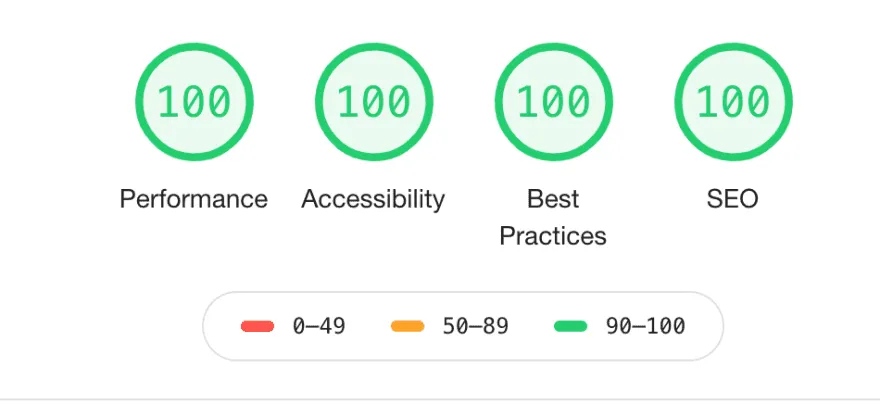
    Recent tests and real-world implementations have shown that websites built using the WordPress Block Editor can achieve perfect scores in SEO, Accessibility, Best Practices, and Performance without requiring extra plugins. Many agencies and website owners have started to move away from heavy page builders, as they often introduce slow load times, bloated code, and accessibility issues.

    A client’s website was recently relaunched using the WordPress Block Editor alone, and the results spoke for themselves: 100/100 scores across all Lighthouse categories, proving that a lightweight and well-optimized setup can outperform traditional page builders.

    Conclusion

    If you want a free, lightweight, and SEO-friendly page builder, the WordPress Block Editor is the perfect choice. By using it as your main page builder, you can create beautiful, high-performing websites that score 100% on Lighthouse, whether you’re targeting a single country or multiple regions. Start building with the WordPress Block Editor today and optimize your website for global success!

  • How to Fix Your Legacy Website

    How to Fix Your Legacy Website

    A legacy website may seem functional, but over time, it can lead to slow performance, security vulnerabilities, poor SEO rankings, and lost revenue. If your site is outdated, it’s time to take action before it impacts your business further. In this guide, we’ll walk you through the essential steps to fix your legacy website and bring it up to modern standards.

    Assess the Current State of Your Website

    Before making any changes, conduct a comprehensive audit to identify major issues, including:

    • Loading Speed Issues – Use tools like Google PageSpeed Insights to check your website’s performance.
    • Security Risks – Outdated CMS versions, plugins, or missing SSL certificates.
    • SEO Problems – Check for broken links, duplicate content, and outdated metadata.
    • Mobile Responsiveness – Test your site on various devices to ensure a seamless user experience.
    • User Experience (UX) Concerns – Analyze navigation, readability, and overall site structure.

    Update Your Website’s Code & CMS

    An outdated website often runs on old technology, making it vulnerable to hacks and performance issues. To fix this:

    • Upgrade to the latest version of your CMS (e.g., WordPress, Joomla, or Drupal).
    • Replace outdated plugins with secure, well-supported alternatives.
    • Migrate to a modern tech stack if your site is using obsolete frameworks.

    Improve Website Speed & Performance

    A slow website can drive visitors away. Speed up your site with these optimizations:

    • Enable caching to reduce load times.
    • Compress images and files to lower page weight.
    • Use a Content Delivery Network (CDN) to improve global accessibility.
    • Optimize code by removing unnecessary scripts and reducing HTTP requests.

    Strengthen Website Security

    Cyber threats are constantly evolving, and legacy websites are prime targets. Improve your security by:

    • Installing an SSL certificate to encrypt data.
    • Using a secure hosting provider with regular security updates.
    • Implementing multi-factor authentication (MFA) for admin access.
    • Regularly backing up your site to prevent data loss.

    Redesign for Modern UX & Mobile-Friendliness

    User expectations have changed, and a poor UX can hurt your brand. Make sure your website:

    • Has a mobile-first design that adapts seamlessly to all screen sizes.
    • Uses modern UI elements such as clean navigation, easy-to-read fonts, and interactive buttons.
    • Follows accessibility best practices to be usable by all visitors, including those with disabilities.

    Optimize for SEO & Improve Content

    A legacy website may have outdated SEO practices that hurt its visibility. Optimize by:

    • Updating meta titles and descriptions with relevant keywords.
    • Fixing broken links and redirects to maintain SEO authority.
    • Enhancing content with fresh, valuable insights for users.
    • Using structured data (Schema Markup) to improve search rankings.

    Migrate to a Scalable Infrastructure

    If your website is struggling with performance or growth, consider:

    • Switching to cloud-based hosting for better scalability and uptime.
    • Adopting a headless CMS for greater flexibility.
    • Upgrading your database and backend systems to improve efficiency.

    Final Thoughts

    Fixing a legacy website is more than just making it look good; it’s about improving performance, security, and user experience. By implementing these changes, you can boost engagement, enhance security, and increase conversions. Don’t let an outdated website hold your business back—start upgrading today!


    Need help fixing your legacy website? Our Affordable Managed IT Services ensure a smooth transition to a modern, secure, and high-performing website. Contact us today for a free consultation!

  • How to Build a Website in 2025: Best Options for Small Businesses

    How to Build a Website in 2025: Best Options for Small Businesses

    Even if you are starting, building a website in 2025 is easier than ever. For small business owners without technical skills or experience in coding, having a professional online presence is essential to attract customers and build their brand. Local bakery, handmade products, professional services, whatever you are selling and need a website for, the right website builder can help you build a website fast.

    This guide explores cost-effective methods for building a website in 2025. Whether WordPress, Shopify, Webflow, or Framer, these are all for those with little to no experience, as owners need a solution.


    What Does Your Small Business Need a Website For?

    A website is not just a website; it is your company’s face. Here is why you need to build a website in 2025:

    • Visibility: 81% of consumers conduct an online search before purchasing.
    • Credibility: A professional website earns the trust of potential customers.
    • Accessibility: Your business runs 24/7 to any customer around the world.

    The Best Website Builders for Small Businesses: 2025

    WordPress : A Customizable Powerhouse

    WordPress is the best option for creating all websites and has always been. It is highly customizable, making it ideal for small business owners seeking control over their website design and ensuring it aligns seamlessly with their company identity.

    Key Features:
    • Thousands of free and premium themes are available for any business type.
    • SEO, e-commerce, and social media integration plugins.• Complete autonomy in terms of design and functionality.
    Pros:
    • Scalable and adaptable to any business profile.
    • The hosting service starts at a low price of $5 per month.
    Cons:
    • Some learning curve for beginners.

    Shopify : Easy E-Commerce Management

    Shopify is a platform specifically designed for e-commerce. If your main goal is to sell products online, then Shopify is tailored for that purpose. It is easy to use, with all the tools you need to run an online store.

    Key Features:
    • A built-in payment gateway and inventory management
    • Shop-Themes, templates designed for online stores.
    • Tools for retrying on marketing, including email campaigns and abandoned cart recovery.
    Pros:
    • Easy to set up and manage.
    • Portable from small to bigger businesses.
    Cons:
    • For bigger stores, the monthly fees can accumulate.

    Webflow : Professional-Looking Design, Without the Code

    With Webflow, you can build a website without touching any code. It is ideal for entrepreneurs who need professional design with a customizable component.

    Key Features:
    • Advanced design features using a drag-and-drop visual editor.• Beautiful & Responsive designs for every device.
    • Animations and interactions of your design.
    Pros:
    • It offers both design flexibility and user-friendliness.
    • SEO-friendly tools built in.
    Cons:
    • The steep learning curve for advanced features

    Framer : includes building interactive prototypes.

    Framer is an innovative web design tool that allows you to create stunning, interactive websites without needing any coding skills.

    Key Features:
    • Easy drag-and-drop editor.
    • To add a more modern feel with sleek animations and transitions.
    • Get started quickly with pre-made templates.
    Pros:
    • Fast to use with no technical background needed.
    • It is excellent for the creative industries.
    Cons:
    • Scalability for complex websites is limited.

    How to Select a Suitable Website Builder

    Here are some tips to help you choose the right platform:

    1. Determine Your Goals: Are you selling products or services or showcasing a portfolio?
    2. Factor In Your Budget: Consider both the initial and recurring costs.
    3. Scalability: Look for a package that will allow your company to grow.

    SEO Tips for Your New Website

    Here are some of the best SEO practices to make sure your website ranks high on Google:

    1. Use Keywords Wisely: Use relevant keywords in headings, page titles, and content to boost your search engine ranking.
    2. Optimize the page titles and meta tags: add your focus keyword to a title and create an appealing meta description.
    3. Make Sure Your Website Is Mobile Friendly: Most users will view your site on a cell phone.
    4. Enhance the page loading speed: Use an optimized image and a quality hosting provider.
    5. Create Quality Content: Write style should be blog posts on your blog, product descriptions, and about pages.

    Conclusion

    Building a website in 2025 does not have to be complicated. For flexibility, WordPress is a great option. If you focus on e-commerce, Shopify is an excellent choice. For those looking to create a professional website, Webflow is ideal. On the other hand, Framer is perfect for anyone who wants to express their creativity in website design. These website builders offer distinct features that make them excellent choices for small business websites.

    Take the first step today to find the right platform, create your new site your way, and let your small business flourish online!

  • 2025 Best WordPress Hacks

    2025 Best WordPress Hacks

    WordPress continues to dominate as one of the most versatile and user-friendly platforms for creating websites. As we step into 2025, it’s crucial to stay ahead of the curve with the best hacks, tips, and tricks to maximize your site’s potential. Whether you’re a beginner or a seasoned pro, these hacks will help you improve functionality, enhance design, and boost performance.


    Leverage AI-Powered WordPress Plugins

    Artificial intelligence is revolutionizing WordPress functionality. Plugins like AI Content Generator and Chatbot Builders can:

    • Automate content creation with relevant, SEO-optimized posts.
    • Enhance customer service with intelligent chatbots.
    • Provide real-time analytics to optimize site performance.

    Pro Tip:

    Integrate AI tools like OpenAI or ChatGPT into your content strategy to personalize user experiences and generate interactive, dynamic content.


    Speed Up Your Website with Critical CSS and Lazy Loading

    Website speed is non-negotiable in 2025. Implement these strategies:

    • Critical CSS: Tools like WP Rocket or Perfmatters optimize your above-the-fold content, loading it instantly for visitors.
    • Lazy Loading: Ensure images, videos, and iframes load only when visible on the user’s screen.

    Pro Tip:

    Combine caching plugins with a Content Delivery Network (CDN) like Cloudflare or Bunny.net for lightning-fast global delivery.


    Utilize Headless WordPress

    Headless WordPress separates the back-end CMS from the front-end display. This allows developers to use modern JavaScript frameworks like React or Vue.js for ultra-responsive, dynamic sites.

    Benefits:

    • Improved speed and scalability.
    • Full customization of the front-end experience.
    • Seamless integration with mobile apps and APIs.

    The Gutenberg editor has come a long way, and block patterns are now a game-changer. Use pre-designed patterns for:

    • Hero sections with bold typography and interactive elements.
    • Call-to-action buttons for better conversions.
    • Dynamic grids for showcasing portfolios, blogs, or products.

    Pro Tip:

    Explore WordPress Block Pattern Directory for free, customizable designs.


    Enhance Security with Biometric Authentication

    As cybersecurity threats evolve, biometric authentication offers an added layer of security. Plugins like WP Biometric Login enable features such as fingerprint or facial recognition for user logins.

    Additional Measures:

    • Regularly update WordPress core, themes, and plugins.
    • Use two-factor authentication (2FA) with apps like Google Authenticator.
    • Limit login attempts to prevent brute force attacks.

    Boost Engagement with Interactive Elements

    Incorporate interactive features that capture user attention:

    • Quizzes and Polls: Plugins like Quiz Maker or Opinion Stage.
    • Gamification: Reward users with points or badges for site interaction using plugins like GamiPress.
    • Dynamic Scrolling Effects: Create visually stunning pages with parallax effects using Elementor or Divi.

    With the rise of smart devices, optimizing for voice search is critical. Ensure:

    • Content uses natural, conversational language.
    • FAQs are structured with schema markup.
    • Pages load quickly and are mobile-friendly.

    Simplify Workflows with Automation Tools

    Automation saves time and effort. Use tools like Zapier or AutomatorWP to:

    • Auto-publish posts to social media.
    • Send email notifications for new user signups.
    • Sync data between WordPress and third-party apps.

    Monetize Smartly with Membership Plugins

    Membership sites remain a top revenue stream. Plugins like MemberPress and Restrict Content Pro can:

    • Create tiered subscription plans.
    • Offer gated content to exclusive members.
    • Integrate with payment gateways like Stripe and PayPal.

    Track Metrics with Advanced Analytics

    Knowledge is power. Use plugins like MonsterInsights or Google Site Kit to:

    • Track detailed user behavior.
    • Measure conversion rates.
    • Monitor site speed and performance metrics.

    Pro Tip:

    Set up custom dashboards with visual data representations to quickly identify trends and areas for improvement.


    Final Thoughts

    2025 is shaping up to be a pivotal year for WordPress users. By integrating these hacks, you can stay ahead of trends, improve user experiences, and grow your online presence. Keep experimenting, stay updated, and watch your WordPress site thrive!

    What hacks are you planning to implement this year? Let us know in the comments below!