Category: Google Services

  • Why Google Search Data Suddenly Dropped in October 2025

    Why Google Search Data Suddenly Dropped in October 2025

    It’s Not a Traffic Crash.

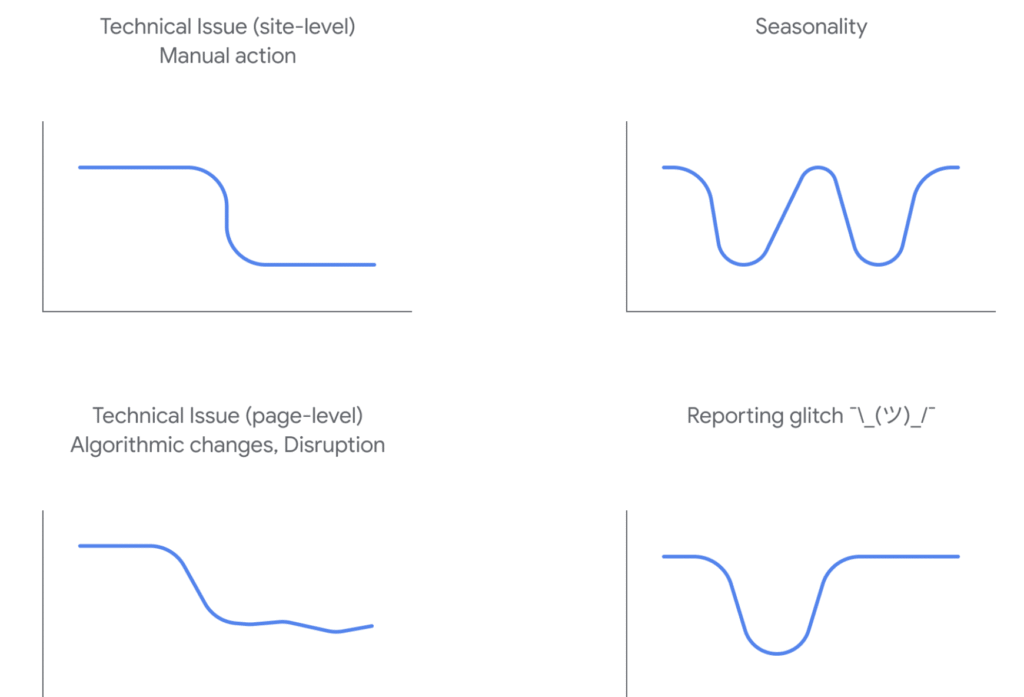
    Many site owners noticed a sharp drop in impressions in Google Search Console starting in October 2025. While it looked like traffic had fallen, the change is actually the result of an update in how Google reports data, along with a few recent algorithm changes.


    Changes in Search Console Reporting
    In late September 2025, Google updated how impressions are counted in Search Console. The change involved removing the &num=100 parameter, which previously allowed users and SEO tools to view up to 100 results per page.

    Because of this adjustment, impressions are now recorded differently. The result is a visible decline in numbers beginning in October — not because visibility dropped, but because impressions are being counted more accurately.

    This update also helped clean up the data by filtering out non-human traffic, such as bots and scrapers. In short, the numbers you see now better represent real user activity.


    What to Focus on Instead

    Impressions might look lower, but that doesn’t mean performance has suffered. Metrics like clicks and click-through rate (CTR) weren’t affected by the change. These figures still reflect genuine user interactions and are a more reliable way to measure search performance.


    Algorithm Updates That Played a Role

    In addition to the reporting change, a few recent algorithm updates have influenced how sites are performing in search.

    August 2025 Spam Update

    This update finished rolling out in late September and targeted low-quality or manipulative content. Sites relying on thin content, spammy tactics, or keyword stuffing often saw a drop in rankings and traffic.

    AI Overviews and Zero-Click Searches

    Google’s expansion of AI-generated overviews has changed user behavior. More searchers now find answers directly on the results page, reducing the need to click through to websites. Even if a page is cited in these overviews, it can still receive fewer visits.


    Other Contributing Factors

    While the reporting change is the main cause, several other factors can influence fluctuations in search data:

    • Competition: A competitor’s improved content or SEO strategy can push your rankings down.
    • Seasonal patterns: Normal shifts in search interest throughout the year can cause dips in traffic.
    • Technical issues: Problems like slow site speed, downtime, or indexing errors can reduce visibility.

    Final Takeaway

    The drop in Google Search Console impressions seen in October 2025 isn’t a true loss of traffic. It’s the result of Google refining how it reports data and the impact of ongoing algorithm updates.

    Focus on the metrics that matter — clicks, CTR, and engagement — to get a clearer view of how your site is really performing.


  • Google reCAPTCHA Pricing Increase: What’s Changing in 2025?

    Google reCAPTCHA Pricing Increase: What’s Changing in 2025?

    If you’re using Google reCAPTCHA on your site, brace yourself: a reCAPTCHA pricing increase is coming in 2025. Many users have already noticed the shift in their billing, and this could have major implications—especially for enterprise-scale traffic.

    Why the Price Hike?

    The increase reflects higher operational costs, AI improvements, and enhanced abuse protection. But it also nudges developers toward enterprise tiers, which offer premium SLA, support, and better risk scores—but at a premium cost.

    How Much More Will You Pay?

    While Google hasn’t publicly listed the exact pricing increases, reports from enterprise users suggest:

    • Up to 25–40% higher than previous plans
    • Free tier users facing tighter limits
    • Custom quotes becoming more common

    Should You Switch to Alternatives?

    For budget-conscious teams, reCAPTCHA alternatives like hCaptcha, Friendly Captcha, and Cloudflare Turnstile are becoming increasingly attractive.

    Final Thoughts

    If you’re affected by the reCAPTCHA price increase, take action:

    • Audit your usage
    • Evaluate need for enterprise features
    • Test out free or lower-cost competitors

    Don’t wait until your next invoice surprises you—adapt early and smartly.

  • reCAPTCHA Enterprise Pricing 2025: What You Should Know

    reCAPTCHA Enterprise Pricing 2025: What You Should Know

    As businesses increasingly rely on Google’s reCAPTCHA to protect digital assets from spam and abuse, understanding the evolving pricing structure is crucial. Heading into 2025, Google has adjusted its reCAPTCHA enterprise pricing, and many teams are reassessing their budgets and alternatives.

    Key Changes in 2025 Pricing

    Google has made pricing more usage-based and tiered. While exact rates depend on traffic volume and enterprise agreements, here’s a general breakdown:

    • Increased costs for high-volume sites.
    • Custom plans for large-scale enterprises.
    • Tighter enforcement of usage limits under the free tier.

    These shifts have prompted businesses to explore reCAPTCHA alternatives or upgrade to ensure continued protection.

    Is reCAPTCHA Still Free?

    Yes, reCAPTCHA free is available but limited. Google offers v2 and v3 versions under a free quota, typically for smaller websites or developers. However, high-traffic sites will likely exceed this limit and face charges.

    What You Can Do

    1. Review your usage data via Google Cloud Console.
    2. Compare enterprise vs. alternative options.
    3. Optimize challenge frequency to stay under limits.

    Understanding the full scope of reCAPTCHA pricing changes will help ensure cost-efficiency and security throughout 2025.

  • You won’t lose leads in 2026 : reCaptcha for free

    You won’t lose leads in 2026 : reCaptcha for free

    👉 No more reCaptcha for free.
    👉 You’ll need a Google Cloud project just to keep using reCAPTCHA.
    👉 You’ll likely face added complexity and higher costs.

    Cloudflare Turnstile

    A Smarter, Alternative reCaptcha for free

    If you’re part of the Gen Z creator economy — managing micro-niche blogs, affiliate PBNs, or just vibing with personal projects — this news may feel overwhelming. But don’t worry. There’s a better solution that’s free (for now) and actually simpler to use:

    Meet Cloudflare Turnstile — A CAPTCHA That Doesn’t Suck

    Cloudflare Turnstile is a privacy-first, user-friendly CAPTCHA alternative that works seamlessly with WordPress plugins like Contact Form 7.

    Benefits for Users:
    • 💸 $0/month (free for up to 20 widgets)
    • 🌐 No Google Cloud setup required
    • 🧠 Smarter, less annoying CAPTCHAs
    • 🛡️ Advanced bot protection included
    • ✅ Now supported in Contact Form 7 v6.1+

    How to Install Cloudflare reCaptcha for free in WordPress

    Here’s a quick step-by-step guide (PDF attached) to help you ditch Google reCAPTCHA and move to Cloudflare Turnstile.

    🔽 Download PDF Installation Guide


    Why This Matters: Cloudflare CAPTCHA is Gen Z-Ready

    Whether you’re running:
    • 🌱 A lifestyle blog
    • 🎮 A gaming landing page
    • 🛒 A Shopify-like WordPress store
    • 🔗 A PBN for affiliate SEO

    … you’ll want to keep things simple, cheap, and effective. Cloudflare CAPTCHA gives you all three.

    Bonus Tip

    If you were using reCAPTCHA plugins (like in WordPress), many now support hCaptcha too. Here is the guide or you can contact us.

    Final Thoughts

    With Google reCAPTCHA shifting to enterprise pricing, it’s time to future-proof your site. Don’t wait until Contact Form 7 forces the upgrade.

    Switch to Cloudflare CAPTCHA or hCaptcha now — your users (and wallet) will thank you.

  • Google reCAPTCHA No Longer Free

    Google reCAPTCHA No Longer Free

    🛠 How to Set Up hCaptcha on Your Website (Simple Guide)

    Switching from reCAPTCHA to hCaptcha is super easy! Here’s a quick setup guide:

    Sign Up at hCaptcha

    • Go to hCaptcha.com.
    • Click Sign Up.
    • Choose “Publisher” if you just want CAPTCHA protection (you can even earn tiny rewards if you want).

    Get Your Site Key and Secret Key

    • After signup, you’ll be given:
      • A Site Key (public)
      • A Secret Key (private, for server-side verification)

    Update Your Website Code

    If you’re currently using Google’s reCAPTCHA, you just replace the script and form attributes.

    Example Basic Form:

    <form action="your-verification-script" method="POST">
    <div class="h-captcha" data-sitekey="your-hcaptcha-site-key"></div>
    <br/>
    <input type="submit" value="Submit">
    </form>

    <!-- Include hCaptcha script -->
    <script src="https://hcaptcha.com/1/api.js" async defer></script>

    ✅ Replace "your-hcaptcha-site-key" with your real key!


    Update Your Backend Verification

    Your server needs to verify the hCaptcha response.

    Example in PHP:

    <?php
    $response = $_POST['h-captcha-response'];
    $secret = "your-hcaptcha-secret-key";

    $verify = file_get_contents("https://hcaptcha.com/siteverify?secret=$secret&response=$response");
    $captcha_success = json_decode($verify);

    if ($captcha_success->success == true) {
    echo "CAPTCHA passed!";
    } else {
    echo "CAPTCHA failed. Try again.";
    }
    ?>

    ✅ Make sure to secure your server-side code and handle failed CAPTCHA attempts carefully.


    Bonus Tip

    If you were using reCAPTCHA plugins (like in WordPress), many now support hCaptcha too — you can simply select hCaptcha in settings after installing a plugin like “WPForms”, “hCaptcha for WordPress”, or “Contact Form 7” integrations.


    🎯 Summary & Guide

    Google’s reCAPTCHA is going paid — but with a quick switch to hCaptcha, you can stay protected for free in just a few minutes.

    Download : Install HCaptcha

  • Google is Migrating reCAPTCHA Users to Enterprise

    Google is Migrating reCAPTCHA Users to Enterprise

    What It Means and Free Alternatives You Should Know

    Google recently announced that they are moving users of the free reCAPTCHA service to reCAPTCHA Enterprise, a more robust (but paid) product. If you rely on reCAPTCHA to protect your websites, apps, or forms from spam and abuse, this change could mean a big cost increase.

    Let’s break down what’s happening — and most importantly, show you free alternatives to Google’s reCAPTCHA so you can stay protected without breaking the bank.


    What’s Changing with reCAPTCHA?

    • reCAPTCHA v2 and v3 (the free versions you’re used to) are being migrated to reCAPTCHA Enterprise.
    • reCAPTCHA Enterprise was originally designed for large businesses and now offers more security features — but at a cost.
    • Pricing: As of early 2025, reCAPTCHA Enterprise starts charging $1 per 1,000 assessments after a limited free quota. This might sound small, but it can add up fast for busy websites.
    • Support: Enterprise customers will get formal support, SLAs (Service Level Agreements), and other business-grade features.

    If you do nothing, your free reCAPTCHA integration may stop working properly — or you’ll eventually receive bills from Google.


    Why Is Google Doing This?

    • Monetization: Google is a business and needs to monetize free services more aggressively.
    • Security: Enterprise reCAPTCHA provides better threat detection and compliance, which is valuable for organizations handling sensitive data.
    • Focus: Google seems to be shifting to a “pay for better services” model across many of its products.

    What Are Your Options?

    You have three main paths forward:

    1. Stay with Google (and pay)

    If you like reCAPTCHA, you can register for reCAPTCHA Enterprise, accept the pricing terms, and update your integrations accordingly.

    But if you want to stay free, keep reading.


    Free reCAPTCHA Alternatives

    Several excellent free (or open-source) CAPTCHA options are available today:

    1. hCaptcha

    • Free for most users.
    • A drop-in replacement for reCAPTCHA — you often just need to swap out the API keys.
    • Focuses on privacy, doesn’t sell data to advertisers.
    • Pro: Easy to migrate. Earn small credits if you opt into certain programs.

    👉 Learn more about hCaptcha


    2. Cloudflare Turnstile

    • Completely free (even for heavy usage).
    • Lightweight, privacy-respecting CAPTCHA alternative.
    • No annoying puzzles — it’s often invisible to users.
    • You don’t need to host your site on Cloudflare to use it.

    👉 Learn more about Turnstile


    3. Friendly Captcha

    • Focuses heavily on privacy and GDPR compliance.
    • Offers a free plan with generous limits for small projects.
    • The mechanism is a bit different — users perform a proof-of-work rather than solving challenges.

    👉 Learn more about Friendly Captcha


    4. Open-Source Captcha Libraries

    If you prefer complete control, you can integrate open-source CAPTCHA libraries like:

    • SimpleCaptcha (Java)
    • BotDetect CAPTCHA (PHP, ASP.NET, Java)
    • Securimage (PHP)

    These require a bit more setup and maintenance but are 100% free.


    How to Choose the Right Alternative?

    Here’s a quick guide:

    If you want…Try this:
    Easiest migrationhCaptcha
    Best user experienceCloudflare Turnstile
    Maximum privacyFriendly Captcha
    Full control / self-hostingOpen-source CAPTCHA

    Conclusion

    The migration of Google’s reCAPTCHA to a paid Enterprise model is a big change, but it doesn’t have to hurt your budget.
    Act now: explore alternatives, migrate your integrations, and keep your websites secure — without surprise bills later.

    If you want to stay updated or need help migrating, feel free to reach out or bookmark this article for future reference.