Category: WordPress Trends

  • WordPress Block Editor Fails to Load? Fix It in 60 Seconds

    WordPress Block Editor Fails to Load? Fix It in 60 Seconds

    If your WordPress Block Editor fails to load, you are likely staring at a white screen or seeing a “Publishing Failed” error. This frustrating issue is rarely a bug in WordPress itself; instead, it’s usually caused by over-aggressive security settings like hotlink protection. In this guide, we’ll show you how to get back to writing immediately.

    Most users assume their site has been hacked or that a plugin is broken. However, the culprit is often something much simpler: Your security settings are too high. specifically, your Hotlink Protection and Content Security Policy (CSP) are blocking the very scripts WordPress needs to run.

    Common Reasons Why the WordPress Block Editor Fails to Load

    The modern WordPress editor is built on React DOM. Unlike the old “Classic Editor,” which was just a simple text box, the Block Editor is a complex application that constantly “talks” to your server via the WordPress REST API.

    If your server sees these internal requests as “unauthorized,” it kills the connection. This results in:

    • The White Screen of Death when opening a post.
    • reCAPTCHA Errors on your contact forms.
    • 403 Forbidden Errors in your browser’s inspection console.

    The Quick Fix: The “Hosting Manager” Solution

    You don’t need to be a coder to fix this. Most modern hosting platforms (like Bluehost, SiteGround, or any cPanel-based host) have a “Hotlink Protection” toggle that is the primary cause of these crashes.

    1. Log in to your Hosting Control Panel (cPanel or your host’s custom dashboard).
    2. In the search bar, type “Hotlink Protection.”
    3. Click on the tool icon.

    Step 2: Disable or Whitelist

    You have two choices here:

    • The Fastest Fix: Simply click “Disable.” This immediately stops the server from blocking script requests. Refresh your WordPress editor, and it should work instantly.
    • The Balanced Fix: If you want to keep protection on, look for the “URLs to allow access” box. Make sure your website URL (e.g., https://mywebsite.com) is listed there.

    Important: Ensure that the checkbox for “Allow direct requests” (or “Allow empty referrers”) is checked. React DOM sometimes sends requests without a standard “referrer” header, and if this box is unchecked, your editor will break.


    Hotlink protection is designed to stop other websites from stealing your images. However, when it is configured poorly, it treats JavaScript files (.js) as images.

    Because React DOM loads scripts dynamically, your server might mistake your own editor for an “outside thief” and block the script from loading. Similarly, Google reCAPTCHA needs to communicate with Google’s servers. If your Hotlink Protection or Content Security Policy (CSP) is too strict, it blocks that handshake, leaving your forms broken.


    Don’t Forget Your CDN (Cloudflare Users)

    If you disabled Hotlink Protection in your hosting manager but the Block Editor is still failing, check your Cloudflare settings:

    1. Log in to Cloudflare.
    2. Go to the Scrape Shield tab.
    3. Toggle Hotlink Protection to OFF.

    Summary Checklist

    If your WordPress site is acting up, follow this 30-second checklist before calling a developer:

    1. Check the Console: Right-click your page > Inspect > Console. If you see “403 Forbidden,” it’s a security block.
    2. Hosting Manager: Search “Hotlink Protection” and disable it.
    3. Test: Refresh your WordPress dashboard.

    By simply allowing your server to recognize its own React scripts, you can fix 90% of Block Editor failures instantly.

  • Trust but Verify:

    Trust but Verify:

    Why Your Coding Skills Still SLAP in the Age of GenAI

    Alright, fam, let’s spill the tea. Everyone’s vibing about GenAI coding tools, and some are even saying, “Is learning to code even a thing anymore?” Hold up, pause. According to a recent Chalk Radio podcast sesh with host Sarah Hansen and coding queen Ana Bell (programmer, author, AND comp-sci prof – talk about a triple threat!), the answer is a big, fat “Trust but Verify.” And honestly? It’s the only way to roll if you don’t want AI to straight-up finesse you.

    AI’s Got Drip, But It Ain’t Perfect 💧😬

    Ana Bell, who’s deep in the coding game, keeps it : Yeah, she uses Generative AI (GenAI) tools. They can be super helpful for getting started. But – and this is a big “but” – these AI sidekicks can totally fumble the bag, especially with the tricky stuff like math or complex programming logic. Even for what seems like simple tasks, AI can serve up some Ls. No cap.

    Your Brain Cells? Still the GOAT 🧠🏆

    This is where your human smarts, your actual coding knowledge, come in to clutch the win.

    • You Call the Shots: Knowing how to code means you can take what AI spits out and actually understand it. It’s a starting point, not the finished masterpiece.
    • Bug Squashing Pro: More importantly, when AI inevitably makes a whoopsie (and it will), your skills let you spot those errors, debug ’em, and fix ’em yourself. Ana Bell straight-up said it’s often easier and faster for her to fix AI’s mistakes directly than to try and re-explain it to the AI like it’s a toddler who just won’t listen. Big mood.

    Lost in Translation: AI’s Chat Game Ain’t Always Strong 🤖💬

    Think about it: trying to get AI to fix its own code by just re-prompting can be a whole vibe check fail.

    • AI’s Guessing Game: These tools are basically playing a high-stakes game of “guess the next word.” They’re probabilistic, meaning they pick what seems most likely. That doesn’t always mean it’s correct or what you actually need.
    • Error Stacking: One little misunderstanding can lead to another, and suddenly your code is a hot mess express. Trying to explain nuances to AI? Good luck, it can easily get confused.
    ai need us for verify

    Why Learning to Code is Still a Power Move 💪✨

    So, what’s the real value of grinding out those coding lessons when AI is in the chat?

    • You’re the Verifier: You’re not just blindly copy-pasting. You have the power to check AI’s work. Is it secure? Is it efficient? Does it even do what you asked? That’s on you, chief.
    • AI as Your Intern, Not Your Boss: Use GenAI to draft the basics, to beat that blank-page anxiety. Then, you step in with your expertise to refine, test, and make sure that code is actually, y’know, good.

    The Human Element: You’re Irreplaceable, Period. 🧑‍💻🔥

    Sarah and Ana were on the same wavelength here: that “verify” part? That’s the human sauce. If you just let AI cook without any checks and balances, you’re playing a risky game. You lose your self-reliance, and you’re way more likely to get led down a buggy, error-filled rabbit hole. Not the flex you want.

    The Takeaway: AI is a Tool, You’re the Artisan 🛠️

    Look, AI coding tools are pretty sick, and they’re here to stay. They can definitely speed things up and help you out. But thinking they’re a replacement for actual, solid programming knowledge? That ain’t it. A deep understanding of coding is what lets you use these AI tools effectively, catch their mistakes, and ultimately build stuff that truly slaps.

    So, keep learning, keep coding, and always remember: Trust the AI to help, but verify its work like your career depends on it… because it kinda does.

  • Achieve a 100% Lighthouse Score with WordPress Block Editor

    Achieve a 100% Lighthouse Score with WordPress Block Editor

    Building a fast, efficient, and SEO-friendly website is a top priority for website owners worldwide. One of the best ways to achieve this is by using the WordPress Block Editor as your main page builder. Not only is it free, but it also allows you to create highly customizable pages while keeping your site lightweight. In this post, we’ll explore why the WordPress Block Editor is a great choice for your website and how it can help you achieve a 100% Lighthouse Score, no matter which region you’re targeting.

    What is the WordPress Block Editor?

    The WordPress Block Editor, also known as the Gutenberg Editor, is WordPress’s default page builder. Unlike the Classic Editor, which relies on a single content box, the Block Editor allows you to build pages using blocks. Each block represents a different element, such as text, images, buttons, or even embedded content. This modern approach ensures a flexible and scalable website structure, crucial for multi-regional SEO.

    Why Choose the WordPress Block Editor?

    It’s Free and Built-In

    One of the best things about the WordPress Block Editor is that it’s completely free and comes built into WordPress. You don’t need to install third-party plugins or page builders, which often add extra bloat to your site, slowing it down in different regions with varying internet speeds.

    Highly Customizable

    Despite being lightweight, the WordPress Block Editor offers a wide range of customization options. You can design your pages using pre-built blocks or create your own custom blocks for a unique look. With block patterns and reusable blocks, designing becomes easier and faster while ensuring a consistent brand experience across different languages and regions.

    Optimized for International Growth

    The WordPress Block Editor is constantly improving, with regular updates from WordPress. It supports multilingual plugins like WPML and Polylang, making it easier to create region-specific content. It also ensures compliance with global accessibility and SEO standards, allowing businesses to expand internationally with confidence.

    Highly SEO-Friendly Across Regions

    Since the WordPress Block Editor is optimized for speed and clean code, it enhances your site’s SEO performance. Faster websites rank better on search engines, and with fewer dependencies, the Block Editor helps you maintain a high Core Web Vitals score, regardless of the country your audience is in. It also allows for structured data integration, helping search engines understand localized content better.

    Achieving a 100% Lighthouse Score

    Lighthouse is a tool that measures website performance, accessibility, SEO, and best practices. Using the WordPress Block Editor can help you achieve a perfect score by ensuring:

    • Fast loading times due to minimal extra code, crucial for mobile users in different regions.
    • Mobile-friendly design with responsive blocks, accommodating different screen sizes across global markets.
    • Clean and accessible HTML that enhances SEO, making it easier for search engines to index your site in multiple languages.
    • No unnecessary JavaScript or CSS slowing down the page, ensuring a seamless user experience across different internet speeds.

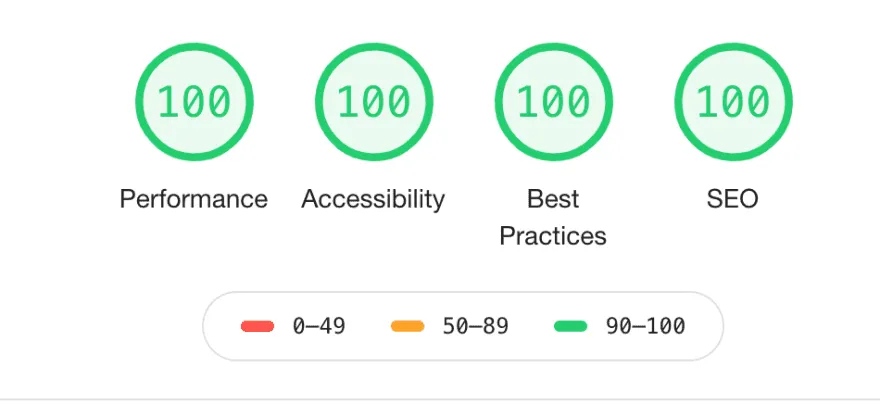
    Recent tests and real-world implementations have shown that websites built using the WordPress Block Editor can achieve perfect scores in SEO, Accessibility, Best Practices, and Performance without requiring extra plugins. Many agencies and website owners have started to move away from heavy page builders, as they often introduce slow load times, bloated code, and accessibility issues.

    A client’s website was recently relaunched using the WordPress Block Editor alone, and the results spoke for themselves: 100/100 scores across all Lighthouse categories, proving that a lightweight and well-optimized setup can outperform traditional page builders.

    Conclusion

    If you want a free, lightweight, and SEO-friendly page builder, the WordPress Block Editor is the perfect choice. By using it as your main page builder, you can create beautiful, high-performing websites that score 100% on Lighthouse, whether you’re targeting a single country or multiple regions. Start building with the WordPress Block Editor today and optimize your website for global success!

  • 2025 Best WordPress Hacks

    2025 Best WordPress Hacks

    WordPress continues to dominate as one of the most versatile and user-friendly platforms for creating websites. As we step into 2025, it’s crucial to stay ahead of the curve with the best hacks, tips, and tricks to maximize your site’s potential. Whether you’re a beginner or a seasoned pro, these hacks will help you improve functionality, enhance design, and boost performance.


    Leverage AI-Powered WordPress Plugins

    Artificial intelligence is revolutionizing WordPress functionality. Plugins like AI Content Generator and Chatbot Builders can:

    • Automate content creation with relevant, SEO-optimized posts.
    • Enhance customer service with intelligent chatbots.
    • Provide real-time analytics to optimize site performance.

    Pro Tip:

    Integrate AI tools like OpenAI or ChatGPT into your content strategy to personalize user experiences and generate interactive, dynamic content.


    Speed Up Your Website with Critical CSS and Lazy Loading

    Website speed is non-negotiable in 2025. Implement these strategies:

    • Critical CSS: Tools like WP Rocket or Perfmatters optimize your above-the-fold content, loading it instantly for visitors.
    • Lazy Loading: Ensure images, videos, and iframes load only when visible on the user’s screen.

    Pro Tip:

    Combine caching plugins with a Content Delivery Network (CDN) like Cloudflare or Bunny.net for lightning-fast global delivery.


    Utilize Headless WordPress

    Headless WordPress separates the back-end CMS from the front-end display. This allows developers to use modern JavaScript frameworks like React or Vue.js for ultra-responsive, dynamic sites.

    Benefits:

    • Improved speed and scalability.
    • Full customization of the front-end experience.
    • Seamless integration with mobile apps and APIs.

    The Gutenberg editor has come a long way, and block patterns are now a game-changer. Use pre-designed patterns for:

    • Hero sections with bold typography and interactive elements.
    • Call-to-action buttons for better conversions.
    • Dynamic grids for showcasing portfolios, blogs, or products.

    Pro Tip:

    Explore WordPress Block Pattern Directory for free, customizable designs.


    Enhance Security with Biometric Authentication

    As cybersecurity threats evolve, biometric authentication offers an added layer of security. Plugins like WP Biometric Login enable features such as fingerprint or facial recognition for user logins.

    Additional Measures:

    • Regularly update WordPress core, themes, and plugins.
    • Use two-factor authentication (2FA) with apps like Google Authenticator.
    • Limit login attempts to prevent brute force attacks.

    Boost Engagement with Interactive Elements

    Incorporate interactive features that capture user attention:

    • Quizzes and Polls: Plugins like Quiz Maker or Opinion Stage.
    • Gamification: Reward users with points or badges for site interaction using plugins like GamiPress.
    • Dynamic Scrolling Effects: Create visually stunning pages with parallax effects using Elementor or Divi.

    With the rise of smart devices, optimizing for voice search is critical. Ensure:

    • Content uses natural, conversational language.
    • FAQs are structured with schema markup.
    • Pages load quickly and are mobile-friendly.

    Simplify Workflows with Automation Tools

    Automation saves time and effort. Use tools like Zapier or AutomatorWP to:

    • Auto-publish posts to social media.
    • Send email notifications for new user signups.
    • Sync data between WordPress and third-party apps.

    Monetize Smartly with Membership Plugins

    Membership sites remain a top revenue stream. Plugins like MemberPress and Restrict Content Pro can:

    • Create tiered subscription plans.
    • Offer gated content to exclusive members.
    • Integrate with payment gateways like Stripe and PayPal.

    Track Metrics with Advanced Analytics

    Knowledge is power. Use plugins like MonsterInsights or Google Site Kit to:

    • Track detailed user behavior.
    • Measure conversion rates.
    • Monitor site speed and performance metrics.

    Pro Tip:

    Set up custom dashboards with visual data representations to quickly identify trends and areas for improvement.


    Final Thoughts

    2025 is shaping up to be a pivotal year for WordPress users. By integrating these hacks, you can stay ahead of trends, improve user experiences, and grow your online presence. Keep experimenting, stay updated, and watch your WordPress site thrive!

    What hacks are you planning to implement this year? Let us know in the comments below!